
Scan a card
- Open PokeScan on your phone, tap Scan a card and allow the camera.
- Hold the card inside the frame. Fill most of the screen, keep it flat and tilt it away from bright lights so there is no glare.
- The camera takes the photo by itself once the card is steady and sharp. The shutter button works too.
- PokeScan reads the card's name, number and set, then shows the closest matches next to your photo. Tap yours. If none of them is right, search by name or number.
On a computer, the scan page shows a QR code. Scan it with your phone and the phone becomes the computer's scanner: every card you scan shows up on the computer, which launches with its own wallet. A webcam works too.
Graded slabs
Slabs from PSA, CGC, Beckett (BGS), SGC and TAG all scan. PokeScan reads the label: the card, the grade and the certificate number, from the label's barcode or QR code when it has one. Where a grader publishes its records, as PSA does, the certificate is checked and its population is shown.
- Scan the front of the slab with the whole label in view. The back only carries the certificate.
- A slab and a raw copy of the same card are one card, so they share one coin. Your slab's grade shows on the coin's page.
Every language
One coin across Europe and America
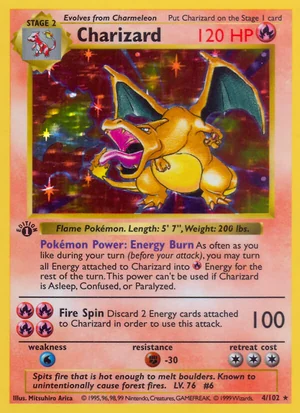
English cards from the US and the UK, and the French, German, Italian, Spanish and Portuguese prints, are the same cards with translated names. They share one coin. A German Glurak is Base Set Charizard 4/102.
Asian cards are their own
Japanese, Korean, Chinese, Thai and Indonesian cards come from their own sets with their own numbers, so each one is a card of its own with its own coin.
The card page
- How rare it is. The card's printed rarity in plain words, and how many cards in its set share it.
- Fun facts. From the card itself and its Pokémon's Pokédex entry: who drew it, how many cards the Pokémon has been printed on, its first card.
- What it sells for. Free market prices from TCGplayer in the US and Cardmarket in Europe, with the UK in pounds.
- Its coin. Who launched it and when, its market cap and its pump.fun page, or a button to launch it if nobody has.
Launch a coin
- Pick the card you scanned. If nobody has launched it, the page says so and the launch button is yours.
- Choose the coin's picture. PokeScan cuts your card out of your photo, flattens it and sets it on a glow in its type's colour. You can use the photo as taken, or upload your own picture.
- Check the name and ticker. Both start from the card's name, and you can change them. Add your X, Telegram or website if you want them on the coin.
- Add a first buy if you like, up to …. It happens in the same transaction as the launch, so nobody can buy before you.
- Connect your wallet and sign. On a computer, Phantom, Solflare, Backpack or any Solana wallet extension works. On a phone, Phantom or Solflare opens and brings you back.
- The coin is live on pump.fun the moment the transaction confirms, and you get its link straight away.
Fees
Every trade of a coin pays pump.fun's creator fee. PokeScan splits that fee when the coin is created, and the split stays the same for as long as the coin trades.
- The split is written into pump.fun's own fee sharing when the coin is created, and its admin key is revoked in the same transaction. Nobody can change it afterwards, PokeScan included.
- pump.fun pays each share straight to its wallet whenever a distribution runs. PokeScan runs one for every coin once its fees add up, and anyone can run one at any time.
The rules
- One card, one coin. Each card's coin address is made from the card itself, so the chain allows exactly one coin per card.
- The first launch to land wins. If two people launch the same card at the same moment, the first transaction Solana confirms creates the coin. The other one fails and costs only its network fee.
- A launched card keeps its coin. Anyone who scans it later sees that coin and can buy it.
- The first scan counts. PokeScan rewards whoever scans a card first. It can't prove who owns a card, so scan the ones in your binder before someone else does.
Safety
- Your wallet signs every launch. PokeScan never asks for your recovery phrase or private key, and never holds your money.
- Your wallet shows the transaction before you sign. It creates the coin, locks the fee split and makes your first buy, and does nothing else.
- Photos are drawn again on our server before they are kept, which removes your location and camera details.
Questions
Do I have to own the card?
You have to scan it. The first launch of a card wins, so scan the cards you have before someone else does.
The scan picked the wrong card
Tap the right one from the matches, or search by name or number. Reprints with the same art are the usual mix-up, so check the card number and the set symbol in the bottom corner.
Someone already launched my card
Then its coin already exists. Open the card's page to see who launched it and buy the coin.
Is a PSA 10 a different coin from a raw copy?
A card has one coin whatever its condition. Your grade shows on the coin's page.
Are Japanese cards their own coins?
Yes. Japanese, Korean, Chinese, Thai and Indonesian cards have their own coins. French, German, Italian, Spanish and Portuguese prints share the English card's coin.
When do I get my share of the fees?
Whenever a distribution runs for your coin. pump.fun sends your … straight to the wallet that launched it.
What does a launch cost?
About …, plus any first buy you add. Your wallet pays it directly.
Is PokeScan part of Pokémon?
PokeScan is a fan-made launchpad. It isn't affiliated with Nintendo, Creatures, Game Freak or The Pokémon Company, and card names and images belong to their owners.
Got a card in a binder nobody has scanned yet?
Scan it first